
The verification email did not reach the employee
Missing a login email for an employee can be frustrating, but don’t worry — there are a few steps you can take to quickly resolve this issue. Below is an instruction on what to do in such a situation.
1. Check the settings when creating the account
Make sure that when creating the employee account you selected the option “send password to the employee’s email”. If this option wasn’t selected, the password email wasn’t sent. 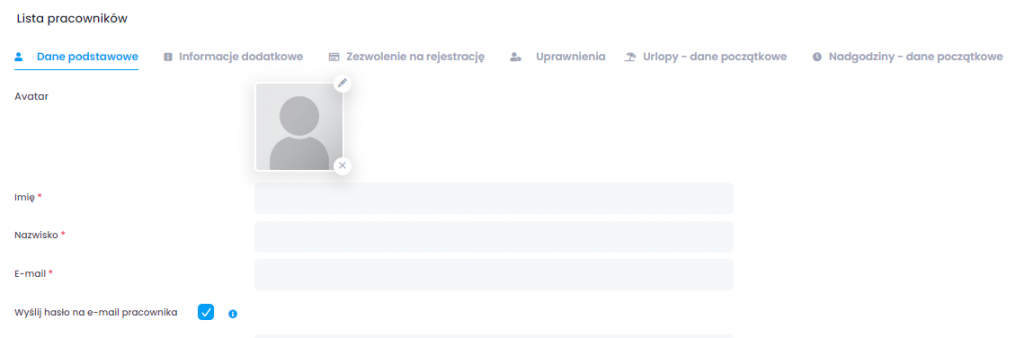
2. Verify the email address is correct
A mistyped email address is one of the most common reasons for delivery problems. Check:
- Whether the email address contains a typo
- Whether the email was entered in the correct format (e.g., jan.kowalski@firma.pl)
3. Check the SPAM folder
Automatically sent messages can sometimes end up in the SPAM folder or another folder in the employee’s mailbox. Ask them to check those locations.
4. Use the “Password reset” function
If the email still didn’t arrive, you can send new login details using the password reset function:
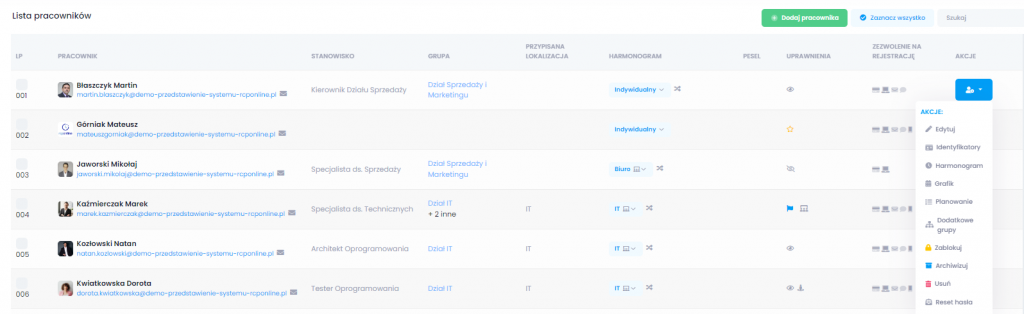
- In the menu, go to: Employees → Employee list.
- For the selected employee, click the actions button and choose “password reset”.
- An email with a new login password will be sent to the provided email address.
5. Still not working? Contact us
If the email still doesn’t arrive, contact our support team. Describe the problem and we’ll promptly try to find the cause and propose a solution.
📩 Support email: info@rcponline.pl
📞 Phone: +48 731 220 088
With these steps, the problem should be resolved quickly and your employee will be able to use the system without issues. Do you need additional tips or help with other system features?