
Integrating the Anviz time recorder with the RCPonline system
Integrating the Anviz recorder with the RCPonline system enables automatic transfer of employee event data, which streamlines working time management in your company. Below you will find detailed instructions for configuration and device synchronization.
1. Configuring a webhook in CrossChex Cloud
To get started, you need to configure webhooks in CrossChex Cloud:
- Sign in:
- Go to us.crosschexcloud.com and sign in to your account.
- Enable Webhooks:
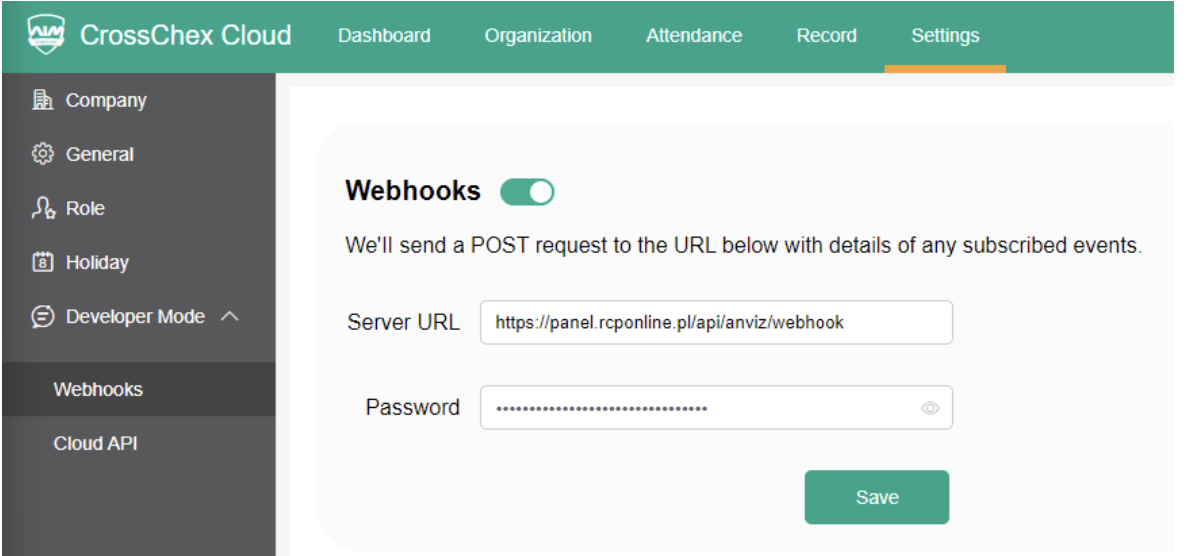
- Go to Settings → Developer Mode → Webhooks.
- Enable Webhook.
- In the Server URL field, enter:
https://panel.rcponline.pl/api/anviz/webhook. - In the Password field, enter the integration code provided by the technical team
Information!
The integration code will soon be available in a dedicated tab Configuration -> Integrations
2. Adding employees in CrossChex Cloud
- Go to the tab:
Configuration -> Import -> Employees - Add employees:
- Import from an XLSX file:
- In RCPonline, go to Employees → Employee list and use Export to XLSX (feature available from the next system update).
- Download the file and import it into CrossChex Cloud.
- Manually add employees:
- Alternatively, you can enter employee data manually in CrossChex Cloud.
- Import from an XLSX file:
- Assign an employee code:
- For the integration to work properly, in RCPonline you must assign each employee a code in the Code field, which corresponds to the same field in CrossChex Cloud.
3. Synchronizing employees with the recorder
- Synchronizing imported employees:
- After importing employees from an XLSX file in CrossChex Cloud, it is necessary to go through all tabs when editing each employee, even if you don’t change any data.
- This process triggers synchronization of data with the recorder.
- Automatic sync when adding manually:
- If employees were added manually in CrossChex Cloud, the data is automatically sent to Anviz recorders.
- Make sure that:
- The employee list in CrossChex Cloud and on the Anviz recorder is identical.
- Employees have the same ID cards assigned in both systems.
Summary
Integrating Anviz recorders with the RCPonline system is an effective way to automate working time registration.
If you have questions or need help with configuration, contact our support team:
📩 E-mail: info@rcponline.pl
📞 Phone: +48 731 220 088